
A good mobile betting app should make the whole account easier to use on a Nigerian phone: finding a match, building a betslip, funding the balance, following live markets and requesting a withdrawal. A large bonus banner does not prove that the app is fast, stable or safe to install. Test the basic journey on your own network and device before relying on it.
MSport currently has a dedicated App link in its official Nigerian navigation, while many betting brands also run mobile websites that behave much like an app. The best choice depends on the format available from the operator itself. An Android APK, an app-store listing, a home-screen web app and a normal mobile site are different products even when they use the same account.
Compare these mobile routes

SportyBet
Compare SportyBet login and account recovery on mobile web before deciding whether the app adds value.

MSport
Reach the MSport installer from the official site and verify its publisher and update route.


Melbet
Test Melbet’s dense event panels and full bet slip on the screen size you normally use.


1win
Check that 1win shows the same balance, cashier and history after moving between web and app.
18+. Install only from a first-party route, protect the login code and set account limits before using a betting app.
Mobile betting formats compared
Format | Installation | Updates | Best use | Main check |
Official Android APK | Downloaded from the operator’s own app page | Install a new official package when prompted | Full-screen betting on Android | Domain, file source and app permissions |
Google Play app | Installed from the Play Store | Usually automatic through Google Play | Simple verified updates when a current listing exists | Developer name and link from the operator site |
iPhone app | Installed from the App Store when offered for the region | Handled by the App Store | Native iPhone use | Publisher, region availability and operator link |
Home-screen web app | Added from the mobile browser | The site updates without a package download | App-like access with little storage | Correct official domain before adding |
Mobile website | No installation; open it in a browser | Always uses the current website version | Quick access on any supported phone | Connection quality and browser compatibility |
MSport app route | Open App from MSport’s official Nigerian navigation | Follow the instructions shown on that live page | Direct route from the verified operator site | Start on the official MSport Nigeria domain |
What makes a betting app useful
Speed is more than the first screen loading quickly. The event list should scroll smoothly, odds should update without moving the wrong selection, and the betslip should stay intact when you switch between competitions. Deposit and withdrawal records should remain easy to find after the payment screen closes.
- Fast opening on both Wi-Fi and mobile data.
- Clear pre-match and live sections with a reliable search tool.
- A betslip that shows changed odds before submission.
- Naira balances, deposits and withdrawals in one account history.
- Simple access to open bets, settled tickets and cashout status.
- Useful notifications that can be turned off by category.
- Account and support controls that remain readable on a small screen.
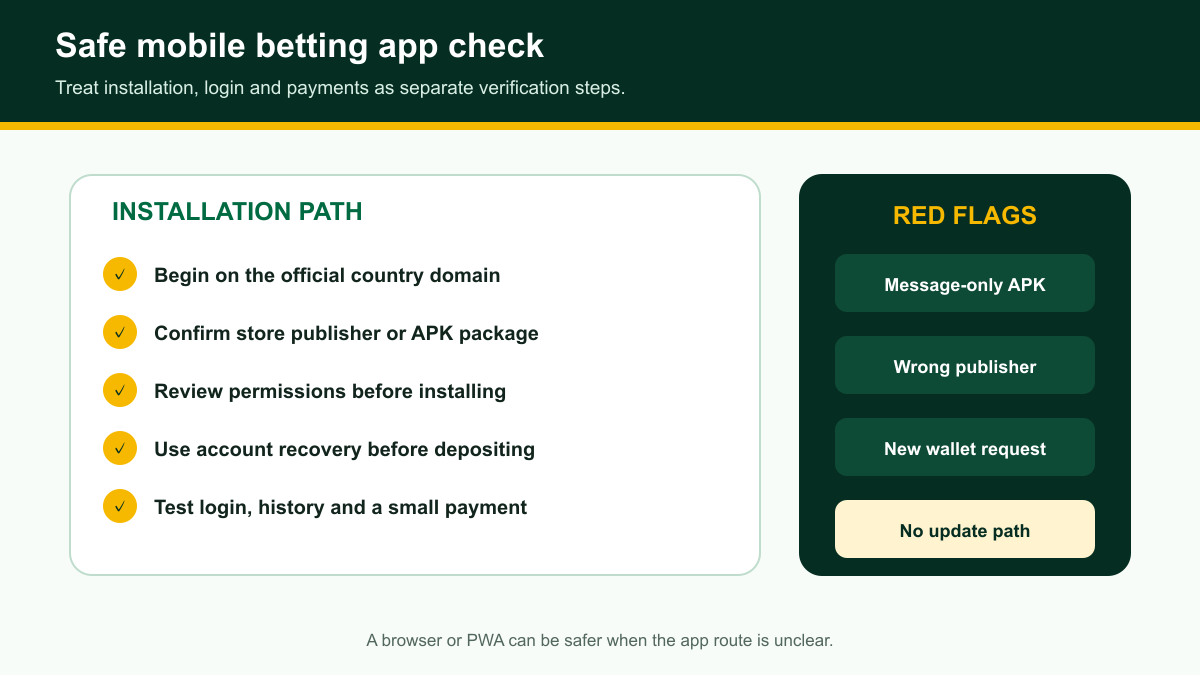
Android betting apps and APK files
An APK is the installation package used by Android. When an operator provides an APK outside Google Play, Android may ask you to allow installation from the browser for that one download. The important part is the source: begin on the operator’s official Nigerian website and use its own App or Download link.
- Type or open the official operator address, then sign out before downloading if possible.
- Use the App link inside the site navigation rather than an advert or message link.
- Check that the download stays on the official domain or its named distribution service.
- Read the Android file warning and confirm the package name before installation.
- Turn off the browser’s install permission again after the app is installed.
- Open the app and confirm that the account history matches the official website.
Do not search random APK libraries for a betting brand. An old or modified package can copy login details, change payment destinations or stop receiving security updates. If the official page no longer offers the file, use the mobile site until the operator publishes a current route.
Betting apps on iPhone
iPhone availability can differ from Android. An operator may use an App Store listing, a mobile website or a home-screen shortcut. Follow the link from the operator’s own Nigerian site because similarly named apps can belong to unrelated publishers or another country.
If there is no current App Store route, Safari can still provide quick access. Open the official site, use Share, choose Add to Home Screen and confirm the name and domain. This creates an icon without installing an unknown package, and the website updates automatically.
Mobile website versus native app
A native app can feel smoother and may keep settings or selected screens available between sessions. A mobile website needs no storage, works across more devices and always loads the current version. Neither format automatically has better odds or faster payments because both usually connect to the same account system.
- Choose the mobile site when storage is limited or installations are blocked.
- Choose an official app when its navigation and live updates work better on your phone.
- Use a home-screen shortcut when you want one-tap access without an APK.
- Compare the same match and market in both formats before deciding.
- Keep one reliable browser route in case an app update fails.
How to test a mobile betting app
A ten-minute test reveals more than a feature list. Search for one upcoming football match, open several markets, add and remove selections, then review the betslip. Switch to a live event without submitting a bet and watch whether prices and score information update cleanly.
- Measure how long the home screen and event list take to open on mobile data.
- Search by team name and competition.
- Open a deep market such as corners or player options.
- Change one selection and confirm the betslip total responds correctly.
- Find deposit, withdrawal and transaction history without using support.
- Open a settled ticket and check whether its result is explained.
- Close and reopen the app to see whether the session and betslip behave predictably.
Live betting on a phone
Live betting places the most pressure on a mobile app. Scores, clocks and odds can update at different times, and a market may suspend while an important moment is reviewed. The submission screen should clearly show a price change or rejection instead of quietly replacing the selection.
A delayed video stream is not a reliable match clock. Use the event status inside the sportsbook and read the final accepted odds on the ticket confirmation. On a weak connection, wait for one clear result before pressing the bet button again.
Data use and phone performance
Animated banners, live visualisations and casino previews can use more data than a plain event list. Look for a light mode, reduced animation setting or the option to stop automatic video. Closing unused live event pages also helps an older phone stay responsive.
- Disable automatic video where the app provides that control.
- Use a compact event view when many matches are open.
- Remove downloaded installation files after a successful update.
- Clear only the app cache when troubleshooting; clearing all data may sign you out.
- Keep enough free storage for the next official update.
- Use Wi-Fi for a large package download, then test normal use on mobile data.
Betting app account security
Use a unique password and protect the email or phone number connected to the account. A real app update does not require you to send a password or one-time code to a person. Payment PINs and wallet codes should stay inside the payment provider’s own screen.
- Install only through the operator’s current official route.
- Check the address before entering login details in an in-app browser.
- Do not save a password on a shared phone.
- Hide ticket and balance notifications on the lock screen.
- Review active sessions after losing or replacing a device.
- Contact official support if the app opens an unfamiliar payment recipient.
App permissions and notifications
A betting app normally needs internet access and may request notifications. Camera access can be useful when uploading an account document, but it should not be required for ordinary match browsing. Contacts, call logs and constant location access deserve extra scrutiny when they have no clear feature attached.
Turn off promotional notifications if they interrupt you. Keep transaction or account alerts only when they help you notice a login, payment or completed withdrawal. Android and iPhone settings can control these categories even when the app offers only a single notification switch.
Updating a betting app safely
Store apps usually update through the store. An APK may show a notice that sends you back to the operator’s download page. If the update prompt opens a different domain, close it and navigate to the official site yourself. Your balance and tickets live in the account, so reinstalling the genuine app should not create a second account.
- Finish or note any pending payment before starting the update.
- Record the current app version if it is visible.
- Download through the same official route used for installation.
- Do not uninstall until the replacement package is ready when data is limited.
- After updating, check open bets and transaction history before placing a new bet.
Common mobile app problems
- Blank screen: change network, close the app fully and reopen it.
- Old odds: refresh the event and wait for a current price before submission.
- Login loop: check the phone time, clear the app cache and use the official web login once.
- Installation blocked: confirm the package source and temporary Android permission.
- Missing betslip: check open and pending tickets before pressing submit again.
- Payment window closed: inspect transaction history before starting another payment.
- App unavailable: use the operator’s mobile site while checking the official download page.
When support is needed, provide the phone model, operating-system version, app version, exact time and the screen where the problem occurred. For a ticket or payment problem, add its reference number. Keep passwords, payment PINs and one-time codes private.
Best Mobile Betting Apps: practical questions for Nigerian players
What is the best betting app in Nigeria?
The best option is the official app or mobile site that runs reliably on your phone, shows clear odds changes, keeps complete ticket records and supports your normal Naira payment route. Test those functions instead of choosing by a bonus banner.
Does MSport have an app page?
Yes. MSport’s official Nigerian navigation currently includes a dedicated App link. Start from the official MSport Nigeria website and follow that current route.
Can I bet on my phone without installing an app?
Yes. A current mobile website can provide the same account, markets, payments and ticket history through a browser. You can also add the official site to the home screen for quicker access.
Is an APK the same as a Play Store app?
No. An APK is an Android installation file that may come directly from the operator. A Play Store app is installed and updated through Google Play. Both should be reached from the operator’s official site.
Why will a betting APK not install?
The download may be incomplete, the package may not support the phone, storage may be low or Android may be blocking that browser from installing files. Confirm the official source before changing any permission.
Do betting apps use different odds from the website?
They normally connect to the same sportsbook, but screens can refresh at different moments. Compare the final accepted ticket, not two prices viewed several seconds apart.
What should I do if the app freezes after I submit a bet?
Do not submit again immediately. Reopen the app or official mobile site and check pending and open tickets. Use the displayed ticket reference if support needs to trace the submission.